

Date code verification with OCR
Reading and verifying date codes on the line
 02
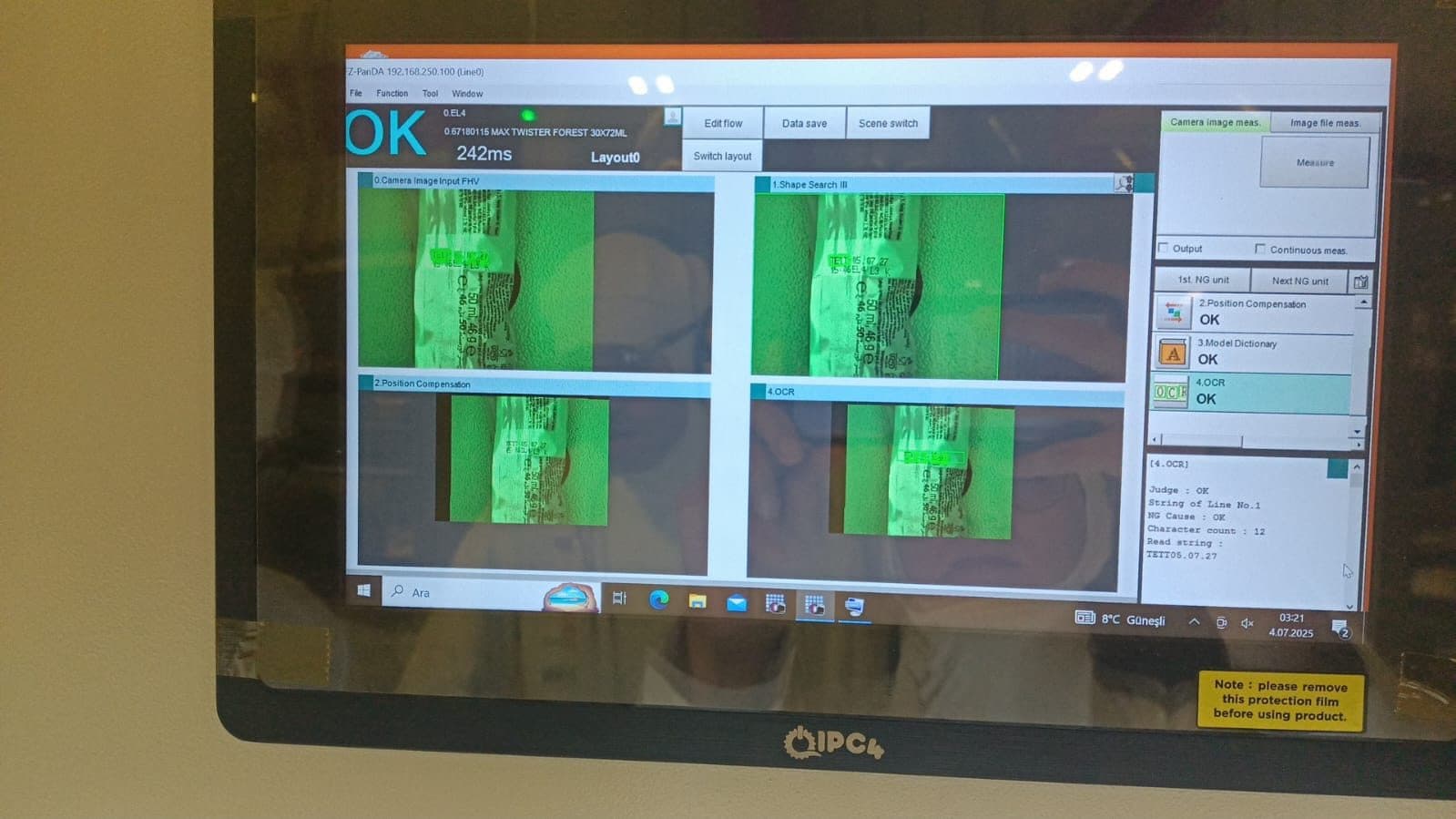
02At an ice cream plant in Konya, expiry dates on packaging are read on the line with OCR technology, and faulty or unreadable prints are removed before shipment.
- Customer
- Bir dondurma üreticisi
- Sector
- Food production
- Location
- Konya, Türkiye
- Field of work
- Machine vision and quality control
- Year completed
- 2026
The need
What had to be solved on site?
Date coding is one of the most expensive mistakes to undo in food production. When the coder head gets dirty or the ink runs low, the print fades, shifts or fails to appear at all — something the naked eye only catches on close inspection.
The dangerous part is that the fault appears across a run, not on a single unit. In the time it takes to notice a coding problem, hundreds of products can be packed with a faulty date, and every one of them then has to be sorted out.
How we solved it
The date printed on each product leaving the line is read instantly by cameras working at line speed and compared with the expected value. Thanks to OCR, it is not only the presence of the print that is verified but its content as well.
Missing, shifted or unreadable prints are detected and removed while still on the line. This prevents a product carrying the wrong date from reaching shipment, and secures food safety and label compliance at the moment of production.
The system works with several inspection windows, and the result of each is shown on the operator screen as OK/NG. When a faulty print repeats, the operator can intervene in the coder straight away.
OCR does a different job from barcode reading. A barcode reader resolves whether the code exists and what it contains from a standardised symbol. OCR has to recognise characters the way a person does: if digit height, character spacing or background contrast are wrong, the read fails. Setup therefore went into lighting and focus more than into the camera itself.
The system checks the string it reads not only for "was it read" but for "does it match the expected value". The date entered by the operator at the start of the shift is taken as the reference and the read string is compared against it. This catches a product that carries a crisply printed but wrong date — something systems that only check legibility miss.
The screen carries a separate OK/NG indicator for each inspection window. A repeating NG in one window signals a mechanical problem: usually the part of the coder head covering that area is blocked. Seeing which window is failing, the operator intervenes at that exact point.
The order we worked in
- 01
Print quality was measured
Before installation, the contrast and character height of the existing print were examined and the lower limit for reliable OCR was established.
- 02
Lighting and focus
Lighting was set at an angle that breaks the glare on the pack surface, and exposure time was tuned so no blur appears at line speed.
- 03
Comparison against a reference
The read string was set to be compared with the expected date entered at the start of the shift, so accuracy is checked as well as legibility.
- 04
Window-level reporting
Each inspection window's result is shown separately, so a repeating NG points to exactly where to look on the coder.
- Inspection type
- Read plus verification
- Inspection windows
- Four separate windows
- Reference
- Date entered at shift start
- Operator visibility
- OK/NG per window
What this changed on the floor
- 01
Verified date information
Expiry dates are read and verified against the expected value.
- 02
Inspection at line speed
Inspection runs at the line's own pace without slowing production.
- 03
Food safety
Products carrying a faulty print are prevented from reaching the consumer.
- 04
Early intervention
A repeating print fault lets the operator intervene in the coder immediately.
Frequently asked about this application
What is the difference between OCR and barcode reading?
A barcode is a standardised symbol designed to be read by a machine; the read either succeeds or it does not. OCR recognises characters printed for people. That makes OCR far more sensitive to print quality, contrast and lighting than a barcode. In exchange, you do not need to add a barcode field to the pack — you inspect the date that is already printed.
What does the system do when the print comes out faint?
When the read confidence score falls below the threshold, the product is marked NG and removed from the line. If NG repeats in the same window it means low ink or a blocked head, so the operator intervenes in the coder. The source of the problem is fixed rather than products being sorted one by one.
What if the date format differs between products?
A separate recipe is defined for each product, holding the expected character count, the format and the position of the inspection window. The operator selects the recipe at changeover and makes no further adjustment.
Does line speed affect OCR performance?
It is affected less by speed itself than by how well exposure matches it. If exposure stays too long the image blurs and characters cannot be recognised. During setup, exposure is set for the line's maximum speed, so reading does not degrade when the line speeds up.
Do you have a similar need on your line?
Describe the defect you need to catch or send a photo of your production line, and we will assess feasibility and the hardware needed together.
Have a project or a material list?
Send us your list; we return stock status, lead time and wholesale pricing the same day.